
DSL, Cable, Fiber, and Fixed Wireless: How Each Technology Reaches Your Home

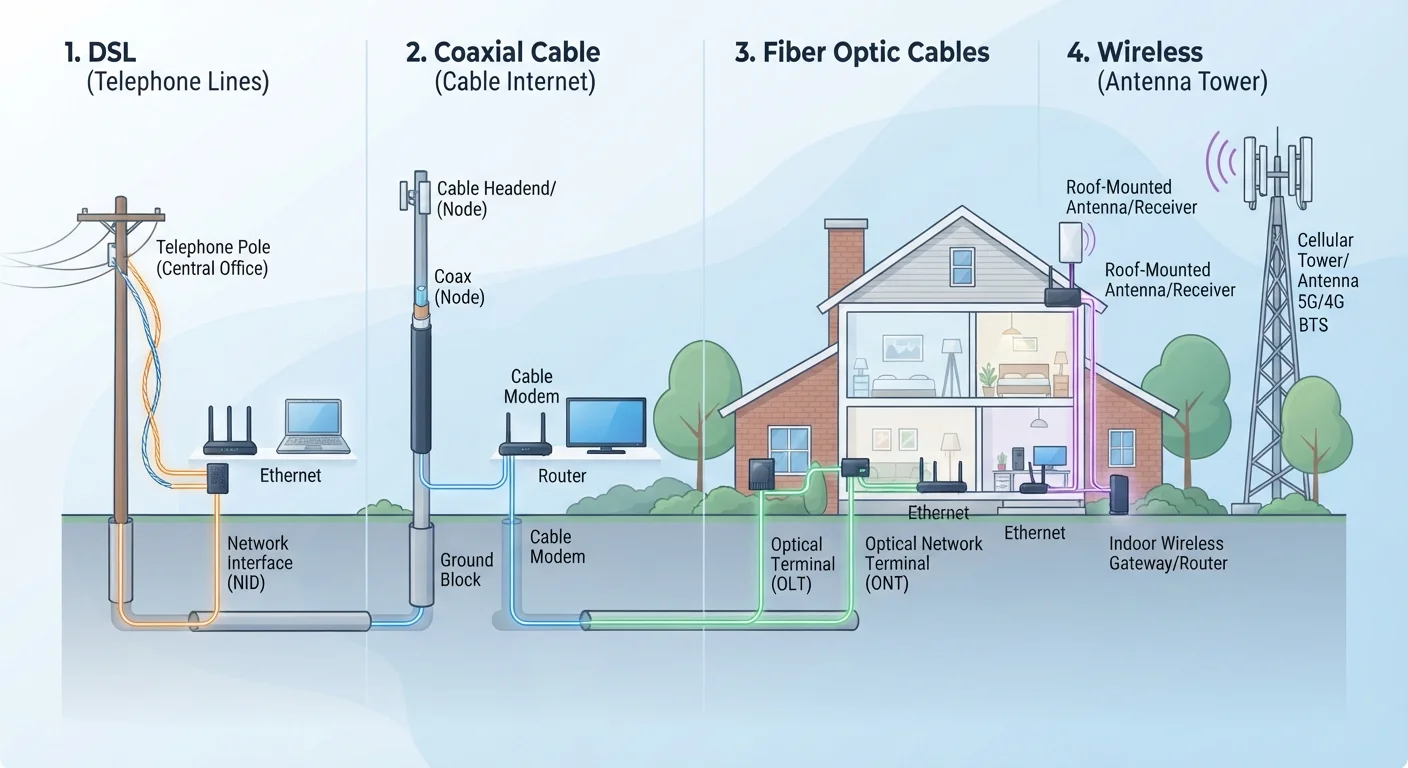
Photo: AscendWit.com | Explore Engaging Blogs. editorial
Key Takeaways
- DSL uses existing phone lines and is widely available but generally delivers slower speeds than newer technologies.
- Cable internet shares bandwidth with neighbors, which can cause slowdowns during peak evening hours.
- Fiber optic is the fastest and most consistent option, but it isn't available in all areas yet.
- Fixed wireless is often the only broadband option in rural areas, but speed depends heavily on line of sight to a tower.
- The technology type - not just the advertised speed - determines how reliable your connection feels day to day.
Why the Technology Behind Your Connection Matters
When you sign up for internet service, the advertised speed is only part of the story. The physical method used to deliver that connection to your home - the actual technology - shapes how consistent, fast, and reliable your service feels in daily use. Two plans with identical advertised speeds can perform very differently depending on whether they use copper phone lines, coaxial cable, glass fibers, or radio signals.
Understanding these four main technologies helps you make sense of your current service and evaluate your options if you ever move or switch providers. For a deeper look at how speed numbers like Mbps and latency translate to real-world experience, see our plain-language speed guide.
DSL: Internet Over Your Phone Line
DSL (Digital Subscriber Line) transmits internet data over the same copper wiring that carries traditional landline phone service. It's one of the most widely available connection types in the US because it piggybacks on an infrastructure that was already installed in millions of homes decades ago.
The main limitation is distance. The farther your home sits from your provider's nearest facility (called a central office), the weaker the signal and the slower your speeds. DSL typically tops out at speeds well below what cable or fiber can deliver, making it less suited to households with multiple simultaneous video streams or large file downloads. That said, it remains a functional option for lighter internet use where no other broadband type is available.
Check Your Service Type Before Troubleshooting
Cable: Faster, But Shared With the Neighborhood
Cable internet runs over the same coaxial cables used to deliver cable TV. It's capable of significantly higher speeds than DSL and is available in most suburban and many urban areas across the country.
The key characteristic of cable is that bandwidth is shared among households on the same local line segment. During peak evening hours when many neighbors are online simultaneously, speeds can drop noticeably. This shared-network architecture is why cable users sometimes experience slower performance at predictable times even on a high-speed plan. If your connection feels inconsistent, these signs that your home setup needs attention can help you distinguish a network-level issue from a problem inside your home.
| DSL | Cable | Fiber | Fixed Wireless | |
|---|---|---|---|---|
| Typical Download Speed Range | 1-100 Mbps | 25-1,000+ Mbps | 100-5,000 Mbps | 25-300 Mbps |
| Upload Speed | Usually slow | Moderate, often asymmetric | Often symmetrical | Variable |
| Infrastructure Used | Copper phone lines | Coaxial TV cable | Glass/plastic fiber strands | Radio waves to antenna |
| Congestion Sensitivity | Low | Higher during peak hours | Low | Moderate to high |
| Geographic Availability | Very broad | Urban and suburban | Expanding, not universal | Rural and underserved areas |
| Weather/Interference Risk | Low | Low | Very low | Moderate |
Fiber: Glass Cables and Light Signals
Fiber optic internet transmits data as pulses of light through thin strands of glass or plastic. It's the fastest widely available residential technology, capable of delivering symmetrical speeds - meaning upload speeds match download speeds - which matters for video calls, cloud backups, and remote work.
Fiber is also the least susceptible to interference and distance degradation. Unlike copper-based DSL, a fiber signal doesn't weaken significantly over the length of a typical residential connection. The catch: fiber infrastructure requires new physical cable runs to neighborhoods and homes, so availability is still expanding. Many rural and some suburban areas don't yet have access. Knowing what technology delivers your service also helps you understand your equipment - see how your modem and router work together for context.
Fixed Wireless: Connecting Rural Homes via Radio
Fixed wireless internet delivers a signal from a tower or antenna to a small receiver mounted on your home - no cable runs required. It's the technology that brings broadband to many rural areas where laying physical infrastructure isn't economically practical.
Performance depends heavily on line of sight: a clear, unobstructed path between your receiver and the provider's tower. Terrain, trees, and buildings can all interfere with the signal. Speeds and reliability vary more than with wired technologies, though newer fixed wireless deployments using higher radio frequencies have improved considerably. Fixed wireless is conceptually related to, but distinct from, mobile 5G home internet products - for a comparison of what cellular-based home internet promises versus delivers, see our 5G breakdown.
Fixed Wireless Installation Needs Professional Assessment
Choosing Based on What's Actually Available
In practice, your choice of connection type may be limited by what reaches your specific address. Checking availability at your location - rather than just what providers serve your general area - is the essential first step. Once you know your options, the technology type should inform your expectations: a fiber plan at a given speed will generally feel more consistent than a cable plan at the same speed, and cable will typically outperform DSL.
Your connection type also interacts with your in-home setup. Even the most capable fiber line can be undercut by an outdated router or poor Wi-Fi coverage. For practical guidance on improving coverage throughout your home, understanding Wi-Fi dead zones is a useful next step. And if you want to decode what your monthly plan actually includes, our guide to internet plan terms breaks down the fine print in plain language.
~25%
US homes lacking access to fiber broadband
According to FCC broadband deployment data, a substantial share of US households still cannot access fiber-optic internet service at their address.
~21 million
Americans estimated to lack broadband access
FCC and independent research estimates suggest tens of millions of Americans remain without reliable high-speed internet, with rural areas disproportionately affected.
The content on this site is for informational purposes only and is not a substitute for professional advice. Always consult a qualified professional for guidance specific to your situation.